
How Do NY Cannabis Suppliers Offer Credit and Report Delinquent Payments in Metrc?
New York cannabis suppliers may offer retailers up to 30 days of credit, but only to dispensaries not on the OCM's Cash on Delivery (COD) list. Since September 15, 2026, delinquency reporting, repayment reporting and retailer disputes are handled inside Metrc rather than the old OCM COD Reporting Platform. This guide covers the rules for offering credit, the Metrc setup, and the step-by-step reporting process for both suppliers and retailers.
What are the rules for offering credit to a NY dispensary?
You are not required to offer credit or payment terms.
Credit may run up to 30 days after the delivery date. Longer terms require OCM approval.
Credit may only be offered to retailers who are not on the COD list.
If you offer credit, you must follow the reporting requirements below.
Disputes can only be initiated by a retailer. The OCM may resolve a dispute if supplier and retailer cannot agree on payment terms, quantity received or price.
Record keeping: keep credit records for at least five years and make them available for inspection. This includes financial records, bank statements, sales invoices, receipts, purchase orders, delivery receipts, retailer delinquency notices and Metrc COD records.
What changed in COD reporting?
The OCM moved all licensees off the OCM COD Reporting Platform and into Metrc. Delinquency reports, repayment reports and disputes now live in Metrc. The only unchanged step is the requirement to notify a retailer in writing before adding them to the COD list.
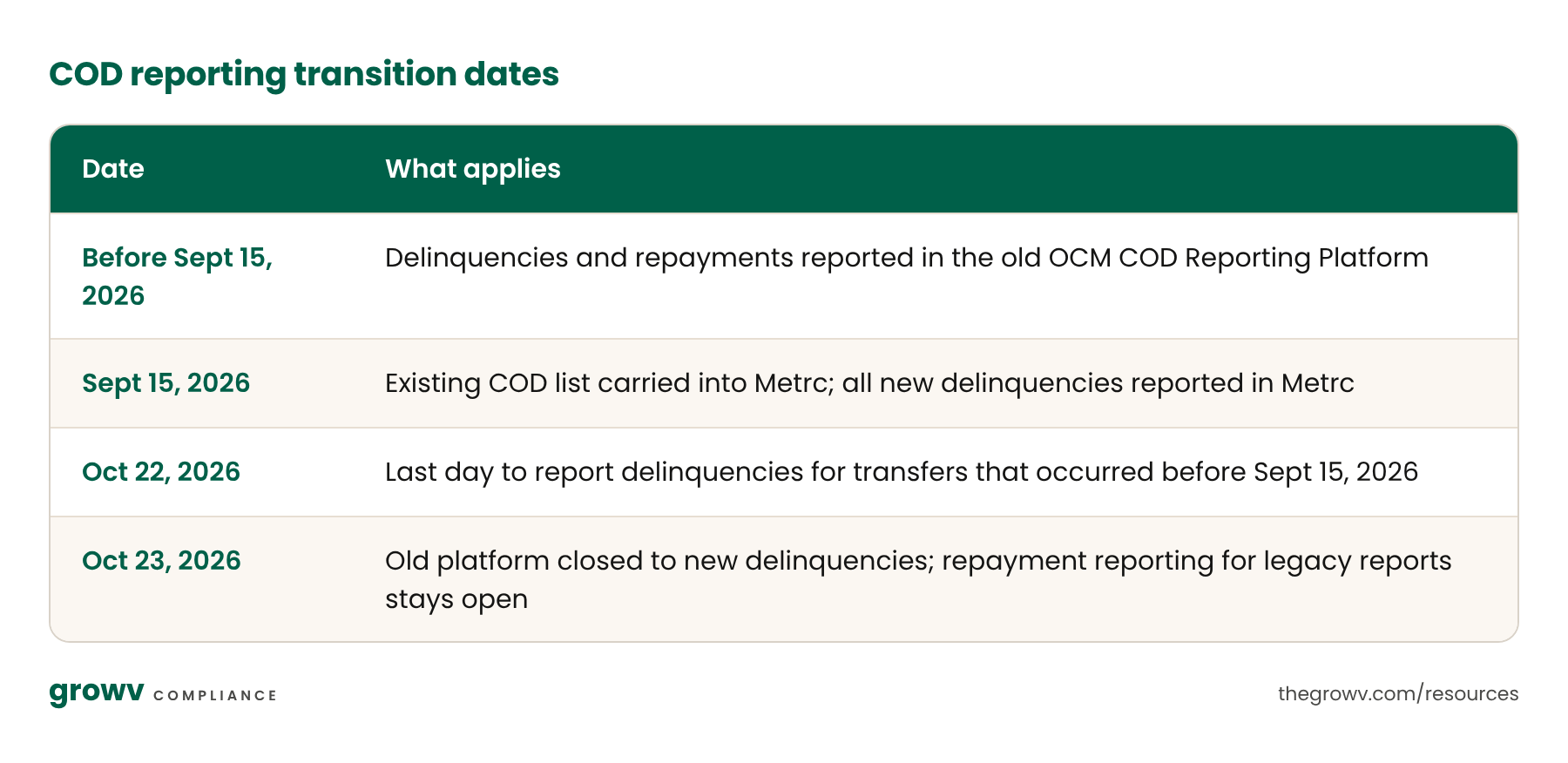
Reported through the old platform? Any delinquency filed in the OCM COD Reporting Platform before the cutover is still resolved there: report payment in full in the old platform, not in Metrc.
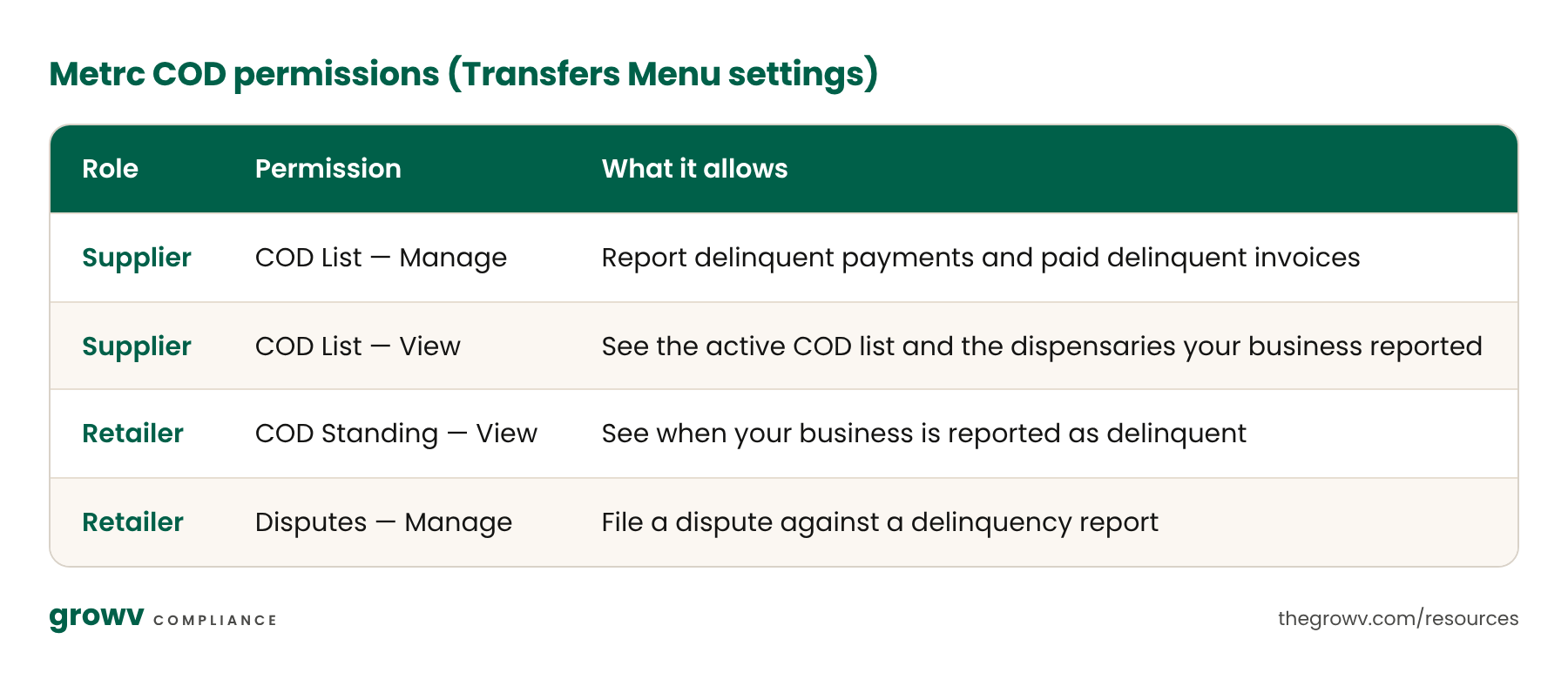
How do I set up COD permissions in Metrc?
Permissions are a one-time setup per authorized user under the Transfers Menu settings.
How do I check a dispensary's COD status before a transfer?
Before creating the transfer: any user with COD List View or Manage permission can check the active COD list in Metrc at any time.
While creating the transfer: when you select the destination license on a new Licensed Transfer, Metrc checks COD status automatically. If the retailer is on the list, Payment Terms locks to "COD (Cash on Delivery)" with the message "Recipient is on the COD List – Terms must be COD." If not, you can select 30-day terms.
No separate portal login or check is needed; it happens inside the normal transfer workflow.
What must be on the Metrc manifest?
Select Payment Terms from the dropdown (30 days or COD).
Enter the Invoice Number. This is now a required field.
Use one invoice number per manifest. Entering more than one triggers a system error.
How do I track credit terms and delinquencies?
Metrc's COD List > My Reported Record tab tracks invoice number, manifest, retailer, delivery date, payment terms, payment due date, notice sent status and date, days past due, status and dispute status. This reduces, but does not eliminate, the need for an internal log; keep a backup for audit purposes. A transfer becomes eligible for COD reporting only after the retailer has received it in Metrc and payment is delinquent.
[Mid-article CTA] Download Growv's credit terms and delinquency tracking log — a ready-made spreadsheet covering every field the OCM expects you to keep. [HubSpot form]
Do I still have to notify the retailer before reporting them?
Yes. The written notice step is unchanged.
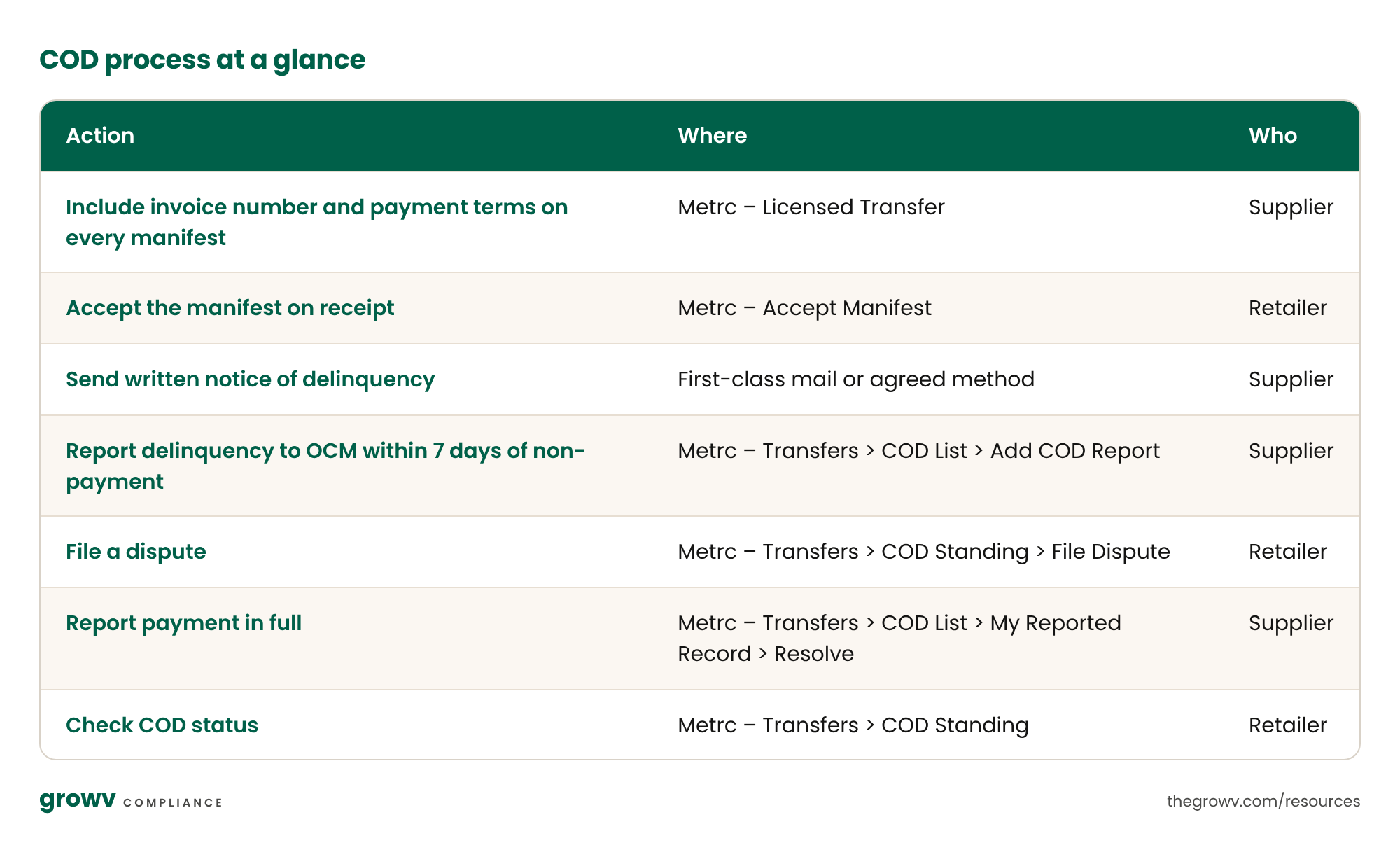
Notify the retailer seven calendar days past the payment due date, on or before the notification due date on the OCM's credit calendar.
Send written notice by first-class mail or another method agreed with the retailer, such as email.
Notify the retailer before reporting in Metrc.
Keep a copy in your business records. Reporting in Metrc removes the old step of sending the notice to the OCM.
The OCM's Notice of Default template is optional, but every notice must include: date sent; retailer business name, license number and address; date of delivery; amount due in dollars and cents; supplier business name, license number and address.
How do I report a delinquency in Metrc?
Go to Transfers > COD List > My Reported Record.
Click Add COD Report.
Search by Invoice Number or Manifest Number; Metrc auto-populates retailer and delivery details.
Enter the Notice Date (the date you notified the retailer). Required.
Submit the COD Report.
The retailer then sees the delinquency under their COD Standing menu and may file a dispute for OCM review.
How do I report that a delinquency has been paid?
From Transfers > COD List > My Reported Record, locate the record and use the Resolve action once payment in full is received. This replaces the old step of emailing the OCM. Report repayment promptly; the legacy rule required notice within one business day of full payment.
I'm a retailer. What do I need to know?
If you are on the COD list: every new transfer to you is locked to COD terms and must be paid on receipt. Suppliers cannot extend credit again until the delinquency is resolved or you are removed from the list. You are placed on the list after a supplier reports an unpaid invoice through Metrc, following a required notice of default to you.
Check your status: Transfers > COD Standing shows any reported delinquencies against your license. Make sure the right staff have COD Standing View permission.
To dispute a report:
Go to Transfers > COD Standing.
Locate the reported invoice and click File Dispute.
Enter the reason and attach supporting documents (up to 5 attachments, 10 MB total).
Submit. The dispute shows as "Under Review" on the My Disputes tab until the OCM acts.
COD process at a glance
Will the process change again?
Yes. The OCM and Metrc are working to automate reporting so that delinquencies are reported automatically rather than at the supplier's discretion.
Frequently asked questions
Can I offer more than 30 days of credit? Only with OCM approval.
What if a retailer pays part of the invoice? Only payment in full resolves a delinquency. Partial payments do not remove a retailer from the COD list.
Do I have to report a delinquent retailer? Reporting is currently at the supplier's discretion if you offered credit, but Metrc and the OCM plan to automate it. Record-keeping obligations apply regardless.
Can a retailer dispute a report? Yes, through Transfers > COD Standing in Metrc. Disputes are reviewed by the OCM.
How long must I keep credit records? At least five years, available for inspection on request.
